
Bookmark Every Digg - GreaseMonkey UserScript
Not long ago, I complained that Digg did not provide a bookmarking option. Now I decided to stop complaing and do something about it. As a result, I created GreaseMonkey Script that provides an option to bookmark each post in digg in three most popular social bookmarking sites - del.icio.us, Furl and Ma.gnolia. You will see the icons of these three services to the right of all titles in the Digg page.
Install Script
To install, you must have the greasemonkey extension for firefox browser. If you have it, click the link and choose "Install".
Screenshot
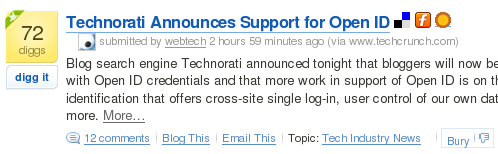
Adding Bookmarking Sites
If you are using a social bookmarking system that is not in the given list, edit the script and add it - it is very easy. First you have to install the script. Now find the Firefox profile directory in your system.
- On Windows XP/2000, the path is usually %AppData%\Mozilla\Firefox\Profiles\xxxxxxxx.default\, where xxxxxxxx is a random string of 8 characters. Just browse to C:\Documents and Settings\[User Name]\Application Data\Mozilla\Firefox\Profiles\ and the rest should be obvious.
- On Windows 95/98/Me, the path is usually C:\WINDOWS\Application Data\Mozilla\Firefox\Profiles\xxxxxxxx.default\
- On Linux, the path is usually ~/.mozilla/firefox/xxxxxxxx.default/
- On Mac OS X, the path is usually ~/Library/Application Support/Firefox/Profiles/xxxxxxxx.default/
The 'xxxxxxxx' stands for a random ID that is changes from profile to profile. Chances are that you will have only one profile, so there will be no confusion. Now open this profile folder and find the 'gm_scripts' folder - this folder cotains all the GreaseMonkey scripts.
Find a file with the name 'bookmark_every_digg.user.js' and open it in any editor. Notepad will do. You sould see the section 'bookmarkers'...
var bookmarkers = [{
		name	: '...',
		favicon	: '...',
		url		: '...',
		width	: ...,
		height	: ...
},
Fill up the details of your bookmarking network in exactly the same way. Please note that special care is to be taken when filling in the URL - the URL of del.icio.us will show up like this....
http://del.icio.us/binnyva?v=2&noui=yes&jump=close&url=%URL%&title=%TITLE%&extended=%DESC%&tags=%TAGS%
- %URL% - will be replaced by the URL of the digg story in question - the original story - not the Digg's comment page about the story.
- %TITLE% - The title of the story.
- %DESC% - The summary of the story.
- %TAGS% - The Topic of the story. Digg does not support tags - yet. So there is only one tag per bookmark.
Find out how the URL of your bookmarking tool is structured and insert these keywords into the appropriate places.
width and height stands for the width and height of the opened popup.